

Business cards for print in the UK: size, bleed and the PDF your printers accept
The standard UK business card is 85 × 55 mm. Here is the bleed, safe area, resolution and PDF settings British printers expect — and how to get all of it from your phone.
Last updated:
A business card is the smallest thing you will ever have printed and the one that most often comes back from the printers with a query. The design is rarely the problem. The file is: the wrong size, no bleed, text too close to the edge, RGB colours that print dull, a font that went missing. This guide covers each of those for the UK, in the order the printers check them.
The standard UK business card size
The standard business card in the United Kingdom is 85 × 55 mm, landscape, the same footprint as a bank card. That is why it fits every wallet, card holder and the slot in a till. Ireland uses the same size, as do France, Spain, Italy and the Netherlands.
| Region | Size | With 3 mm bleed |
|---|---|---|
| United Kingdom, Ireland, France, Spain, Italy, Netherlands | 85 × 55 mm | 91 × 61 mm |
| Germany, Poland, Austria, Switzerland | 90 × 50 mm | 96 × 56 mm |
| Australia, New Zealand | 90 × 55 mm | 96 × 61 mm |
| United States, Canada | 89 × 51 mm (3.5 × 2 in) | 95 × 57 mm |
| Japan | 91 × 55 mm | 97 × 61 mm |
| Square | 55 × 55 mm | 61 × 61 mm |
Portrait cards are the same sheet turned through 90 degrees; nothing changes for the printers. Rounded corners (usually a 3–6 mm radius) are a finishing option and do not change the file. Square and slim cards exist but cost more because they need a separate cutting forme, and they do not fit a standard card holder.
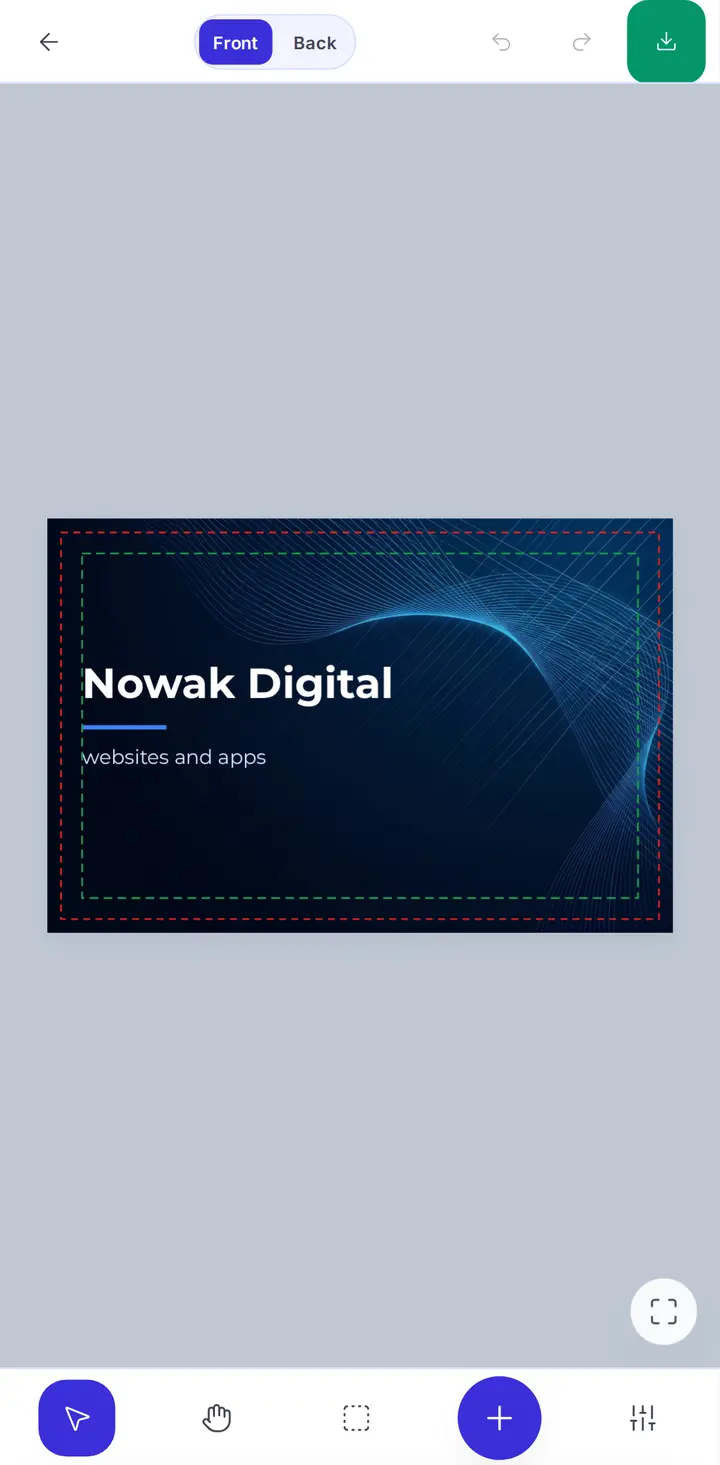
One rule to remember: design at the trimmed size, add 3 mm bleed on all four sides, keep everything important 3 mm inside the trim.
Bleed, trim and the safe area
Three lines matter in a print file, from the outside in:
- Bleed line: 3 mm outside the trim. Backgrounds, photos and any colour that touches the edge must extend to this line. The press prints a larger sheet and the cards are guillotined out of it; the cut can land anywhere within about a millimetre of the trim line, and the bleed is what keeps the edge solid.
- Trim line: the final 85 × 55 mm edge of the card. This is where the blade aims.
- Safe area (also "quiet zone"): 3 mm inside the trim. Text, logos, phone numbers and anything you would hate to lose stay inside this line. A mobile number ending a millimetre from the edge looks fine on screen and loses its last digit on one card in twenty.
So a file with bleed measures 91 × 61 mm, and the live area for text is 79 × 49 mm. If the design has a white background and nothing touches the edge, you can skip bleed, but the safe area still applies.
Resolution: 300 dpi for images, vector for everything else
Printers ask for 300 dpi (dots per inch) at the final size. For an 85 × 55 mm card that is 1004 × 650 pixels; with bleed, 1075 × 721 pixels. A logo saved from a website at 400 pixels wide will print visibly soft. A phone photo (usually 3000–4000 pixels wide) is more than enough.
Resolution only applies to photos and other raster images. Text, lines, shapes and a logo built from shapes should be vector: described as curves, not pixels, so they stay perfectly sharp at any size. A PDF keeps vectors as vectors; a PNG or JPG flattens everything into pixels, which is why printers prefer the PDF even when they accept both.
CMYK, not RGB
Screens make colour with red, green and blue light (RGB). Presses mix cyan, magenta, yellow and black ink (CMYK). The CMYK range is smaller: pure RGB blue, bright orange, lime green and hot pink cannot be reproduced and come out duller.
If you upload an RGB file, the printers convert it and you see the result when the box arrives. If you convert to CMYK before exporting, you see the shift on screen while you can still adjust. Two practical rules:
- Rich black for large areas: a background of 100% K alone prints as dark grey. Printers use "rich black", for example C 60 / M 40 / Y 40 / K 100, for solid areas. Small text stays 100% K only, otherwise the four inks misregister and the letters get coloured fringes.
- Avoid tiny text in light colours or reversed out of a photo. Below about 6 pt, knockout text fills in.
Black-and-white designs, one-colour cards and anything in greys are unaffected by all of this and are the cheapest to print.
Fonts: embed or convert to outlines
The classic surprise: the card arrives in Arial because the font you chose was not on the printers' computer. Two fixes exist. Embedding packs the font inside the PDF. Converting to outlines turns every letter into a shape, so no font is needed at all. Outlines are the safer option for a business card, where nobody needs to edit the text after export.
Minimum readable sizes on a card: 7–8 pt for a phone number or e-mail, 6 pt for a legal line (a company number, a VAT number), 10–12 pt for the name. On uncoated stock go one size larger: ink spreads a little into the paper.
What goes on a business card
A card that works has four things and stops there: who you are (name and role), what you do (business name, one line of what you offer), how to reach you (one phone number, one e-mail, one web address) and a visual anchor (the logo or a strong colour). A QR code to your website, menu or booking page is worth the space; a QR code to a PDF of the same card is not. Limited companies often add the registered company number on the back; it is not required on a business card, only on letterheads and invoices.
Double-sided cards cost little more than single-sided and give you a clean front (logo, name) and a working back (contacts, services, QR code). If the back is a solid brand colour, it needs bleed on all four sides.
Paper stock and finish
UK printers quote stock in grams per square metre (gsm):
| Stock | Feel | Typical use |
|---|---|---|
| 300 gsm silk | light, bends easily | budget runs, event cards |
| 350 gsm silk or matt | the standard card | most businesses, best value |
| 400–450 gsm silk, matt or uncoated | noticeably stiffer | the usual upgrade, consultants, trades |
| 540 gsm and triplex (layered with a coloured core) | rigid, luxury feel | estate agents, design studios, premium brands |
| Kraft, cotton, textured | natural, tactile | cafés, craft, florists |
Finishes: matt and silk are easy to read and write on; gloss makes photos vivid but shows fingerprints; soft-touch laminate feels like velvet and costs more; spot UV puts a gloss highlight on one element (a logo) over a matt card. A finish is ordered, not designed, with one exception: spot UV and foil need a separate "mask" file showing where they go.
The export checklist
Before you upload the file, check:
- Size 85 × 55 mm plus 3 mm bleed on every side (91 × 61 mm in total).
- Everything important at least 3 mm inside the trim.
- Photos and logos at 300 dpi at final size.
- Colours in CMYK, solid backgrounds in rich black, small text in 100% K.
- Fonts embedded or converted to outlines.
- One PDF page per side, crop marks on, no printer's marks inside the bleed.
- Spelling of the phone number and e-mail checked by someone else.
Doing all of this on your phone
OlingoPrint sets the UK business card to 85 × 55 mm with bleed and safe area already drawn, so you cannot put a phone number too close to the edge without the assistant saying so. You pick a template for your trade (a plumber, a salon, an estate agent, a café), change the text and the photo with one finger, turn the card in 3D to check the back, and export a PDF with 3 mm bleed, crop marks, CMYK colour and text converted to outlines. The free version adds a watermark; Pro removes it.
That PDF is what the printers ask for. Upload it to any online printer or take it to the print shop on the high street, and it prints first time.
Frequently asked questions
What size is a standard business card in the UK?
85 × 55 mm, the size of a bank card, so it fits every wallet and card holder. With bleed the file is 91 × 61 mm: an extra 3 mm on every side that is trimmed off. Ireland and most of Western Europe use the same size; the US uses 89 × 51 mm (3.5 × 2 in), Australia 90 × 55 mm.
What is bleed and do I really need it?
Bleed is the 3 mm of background that runs past the trim line. Guillotines are never perfectly exact, so without bleed a hairline of white can show along one edge. Any design with a coloured background or a photo touching the edge needs it. A white card with content in the middle does not.
What resolution should a business card be?
300 dpi at final size for photos and logos. At 85 × 55 mm that is 1004 × 650 pixels, with bleed 1075 × 721. Text, lines and shapes should be vector, so they stay sharp whatever the size.
CMYK or RGB for business cards?
CMYK. Presses mix cyan, magenta, yellow and black; an RGB file is converted by the printers and bright blues, oranges and greens come out duller. Converting on your side, before you upload, shows you what you will actually get.
Which file format do UK printers want?
A PDF with 3 mm bleed, crop marks and fonts embedded or converted to outlines, one page per side. Most online printers also accept JPG or PNG, but any text in them is a raster image and prints softer.
What paper weight should I choose?
350 gsm silk or matt is the UK standard. 400–450 gsm feels premium; 300 gsm is the budget option and bends easily. Uncoated stock can be written on; gloss makes photos pop but shows fingerprints.
Can I make a print-ready business card on my phone?
Yes. OlingoPrint has the 85 × 55 mm size with bleed and safe area already set, converts text to outlines, exports in CMYK and adds crop marks. You pick a template, change the text and export a PDF your printers accept first time.